
True Tie: Tie Knot Guide
Twin Brothers Payam & PeymanBeauty
4.750.00 Reviews
- Version
- 8.1
- Installs
- 50.00K
- Age Rating
- Everyone
Screenshots
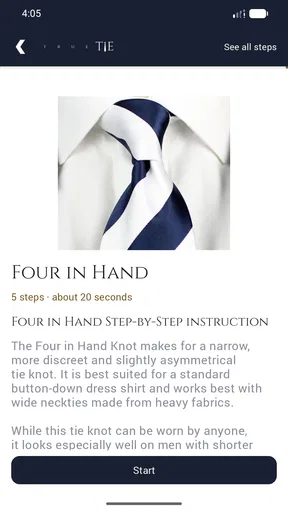
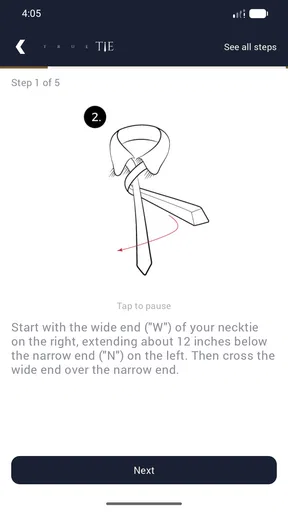
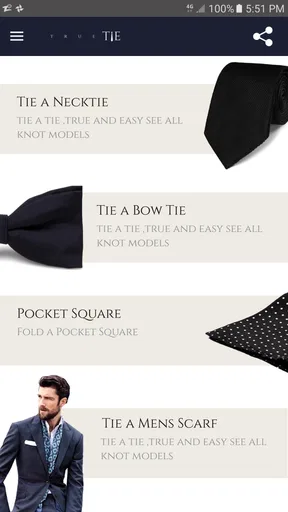
Our Review of True Tie: Tie Knot Guide
 Analysis by Appyee
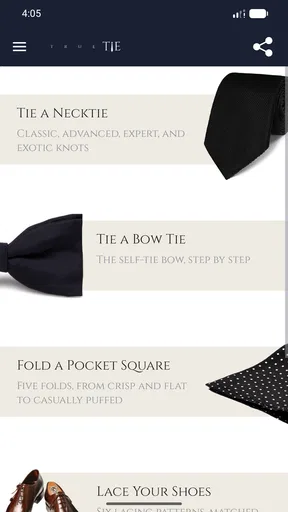
Getting dressed well often comes down to a small detail that is easy to overlook: knowing what to do with a tie, scarf, bow tie, or even a pair of shoelaces. True Tie: Tie Knot Guide is a focused beauty and personal-style app from Twin Brothers Payam & Peyman that turns those moments into visual lessons. I found its idea refreshingly practical. It does not try to become a full wardrobe planner or a social fashion platform; it concentrates on teaching knotting and lacing techniques in a format you can check while your hands are busy.
That narrow purpose is also the reason it can be useful. If you have ever stood in front of a mirror before an interview, wedding, formal dinner, or presentation and forgotten how to make a particular knot, a visual guide is more helpful than a paragraph of instructions. The app is free, rated for Everyone, and works on devices running Android 6.0 or later. Its current version is 8.1, and its release history reaches back to October 19, 2016, so this is an established utility rather than a brand-new experiment.
Learning a knot when the connection is not the main character
The first thing I noticed is that the experience is built around looking, pausing, and copying. That matters because knot instructions are difficult to absorb when they are written in abstract terms such as “cross the wide end over the narrow end.” A visual sequence gives your eyes a shape to match, which is much easier when you are still developing a sense of direction.
In a normal connected environment, the app is straightforward to approach. You can open it before leaving home, choose the style you want to practice, and keep the phone nearby while working through the steps. There is no need to turn the lesson into a long research session. The app’s subject is already defined: ties, bow ties, scarves, and shoe lacing. That clear scope helps when you need an answer quickly rather than a broad collection of fashion advice.
One useful habit is to inspect the complete sequence before trying it. I recommend looking at the final shape first, then returning to the beginning and copying one movement at a time. This prevents a common mistake: following the hand movements correctly but ending with the fabric facing the wrong way because the intended result was never clear. With a tie, that small orientation error can make the final knot look uneven even when every crossing seemed familiar.
The app is especially helpful when a network connection is unreliable, because the confirmed experience is designed around clear visual steps that are available offline. That makes it suitable for places where browsing for a tutorial is inconvenient, such as a hotel room with poor reception, a backstage changing area, or a train before an event. I still prefer to open and explore the guide before I am in a hurry, but the offline character removes one frustrating dependency at the moment when concentration matters most.
That does not mean every learning situation is equally well served. A visual guide can show sequence, but it cannot physically correct the tension in your hands. If your knot keeps collapsing, you may need to slow down, loosen the fabric, and compare the angle of each fold with the illustration. A video with a visible presenter can sometimes explain fabric tension more naturally, while this app is better at giving you a quiet reference that you can revisit without waiting for playback.
Why the phone format works in real situations
I can imagine using it in several everyday ways. Before a job interview, I would practice the chosen tie knot once with an older tie, then repeat it with the tie I plan to wear. Before a wedding, I would use the bow-tie section to rehearse without the pressure of guests already arriving. For travel, the scarf and shoe-lacing instructions are more relevant than they might first appear: both can help you make a familiar item look more deliberate when your clothing options are limited.
The small screen is both an advantage and a compromise. It keeps the lesson close to the mirror and does not require a desk or printed sheet. At the same time, detailed hand positions can feel cramped on a smaller phone. I found that placing the device slightly to the side, rather than directly below my hands, made it easier to glance at the next step without completely losing the fabric position.
A second practical tip is to keep the tie at roughly the same height as the guide’s example. Beginners often hold the narrow end too high or too low, then blame the knot when the proportions look wrong. The app can show the movement, but the final length still depends on how you begin. I would treat the first attempt as a setup exercise and adjust the starting position before deciding whether a knot suits you.
For scarves, the app’s value is not limited to formal clothing. A scarf can be tied for warmth, appearance, or simply to stop it from slipping while walking. The visual approach is useful here because a written description of loops and folds can become confusing quickly. I would still choose a different source if I wanted advice about fabric choice, seasonal styling, or matching colors; this app is a technique guide, not a complete fashion consultant.
What happens when a lesson does not go smoothly
Failure with a knot usually comes from one of three things: losing track of which end is moving, reversing a step, or pulling too tightly before the structure is complete. The app helps most with the second problem. When I make an incorrect crossing, I can return to the relevant visual stage instead of restarting from memory. That makes practice less discouraging than trying to reconstruct the whole sequence from the beginning.
My preferred recovery method is to stop immediately when the shape no longer resembles the example. Pulling harder rarely fixes a wrong crossing; it usually creates a tighter mistake. I would loosen the last movement, return to the previous recognizable position, and compare the two ends again. This is a small workflow, but it turns the guide into something more useful than a one-time glance.
There is also a benefit to using the app before an important occasion rather than during it. Under time pressure, even a simple visual instruction can feel difficult because you are dividing attention between the phone, the mirror, and the clothing. Practicing once when there is no deadline lets you remember the general rhythm. Then, on the actual day, the app becomes a safety net instead of the only thing keeping the knot together.
The same principle applies to shoe lacing. If you are learning a decorative pattern, it is better to begin with loose laces and a shoe placed on a chair or table. Trying to follow a detailed pattern while the shoe is on your foot makes it harder to see the crossings and can lead to unnecessary tightening. Once the pattern is complete, you can test whether it remains comfortable while walking. A visually attractive arrangement is not automatically the best everyday choice if it creates pressure or makes the shoe difficult to adjust.
One limitation is that visual instructions do not always answer the question “why this step?” If you want to understand the history of a knot, its suitability for different collar shapes, or the difference between fabrics, you will likely need another resource. I see that as a deliberate trade-off rather than a flaw in its core purpose. The app is strongest when the immediate problem is “show me how,” not “teach me everything about formal dressing.”
Using it carefully when mobile data matters
Because the lessons are available offline, True Tie fits well into a data-conscious routine. I would open it while connected, browse the available techniques, and then rely on the stored visual guidance when preparing elsewhere. This is particularly convenient for travelers who do not want a small clothing emergency to become a reason to search the web or stream a tutorial.
Offline access also changes how I think about battery and attention. A web search can lead to several pages, advertisements, autoplaying videos, and unrelated recommendations. A dedicated guide keeps the task narrower. That does not make it automatically superior for every learner, but it reduces the number of distractions between remembering a knot and wearing it successfully.
There is a useful distinction between needing information and needing demonstration. If you want a quick reminder of a technique you have already practiced, the app is a good fit. If you need a slow explanation with spoken narration, close-up camera angles, or a real person showing how different materials behave, an online video platform may be better. The choice depends less on the connection itself than on the teaching format you find easiest to follow.
I would also avoid assuming that offline guidance removes every practical concern. The phone still needs enough charge to be useful, and a dark room can make small visual details harder to read. Before traveling, I would test the guide in the lighting where I expect to use it and practice the most important technique once. That simple preparation is more reliable than discovering at the last moment that the screen position, fabric color, or room lighting makes the steps difficult to distinguish.
For parents or younger users, the Everyone age rating makes the app approachable as a basic skills tool. An adult may still want to supervise the first attempt with a tie or laces, not because the content is inappropriate, but because hand coordination and fabric tension can be frustrating for beginners. The app can encourage independence after the sequence has been understood.
Who will get the most from this focused guide
I would recommend it to someone who owns formal clothing but does not yet have reliable knotting habits. It is also a sensible companion for students preparing for interviews, travelers packing one versatile outfit, and anyone who wants to make a scarf or bow tie look intentional without asking another person for help. The combination of a free price and a focused subject makes it easy to try without committing to a larger styling service.
Its audience is broader than people who wear business suits every day. A person who only needs a tie a few times a year may benefit even more, because occasional users are the ones most likely to forget the sequence. Likewise, someone who has learned one basic knot may use the app to explore alternatives for different occasions instead of repeating the same shape automatically.
The app has earned a 4.7 average from around 1.1 thousand ratings, and it has passed 50 thousand installs. Those figures suggest that the simple concept has found a real audience, but I would not choose it solely for popularity. Its suitability depends on whether step-by-step visuals match the way you learn. If you prefer narrated demonstrations, interactive coaching, or advice based on your exact outfit, another option may serve you better.
The developer, Twin Brothers Payam & Peyman, has kept the product recognizable as a practical reference rather than turning it into a crowded beauty platform. That restraint is welcome. I did not need accounts, social features, or a stream of style content to solve the problem in front of me. On the other hand, users looking for outfit planning, shopping guidance, or personalized recommendations should not expect this small guide to replace those tools.
My connectivity verdict after using the guide
True Tie works best when connectivity stays in the background. Its strongest quality is not a sophisticated online service but the ability to give you a visual answer in the place where you actually need it: beside a mirror, near a suitcase, or at the final stage of getting ready. The offline design makes that use more dependable, while the focused structure keeps the phone from becoming a distraction.
I would choose it over a general web search when I already know that I need a tie, bow-tie, scarf, or shoe-lacing lesson and want to practice without sorting through unrelated results. I would choose a video tutorial instead when I need spoken explanations, close-up demonstrations of fabric behavior, or help diagnosing a problem that the still sequence cannot make clear.
The most realistic expectation is simple: this app can show you the order of movements, but your hands still need practice. Give yourself one rehearsal, keep the fabric loose until the structure is right, and use the final shape as a reference rather than pulling through each step blindly. With that approach, the guide becomes more than a quick novelty.
For me, the best reason to install it is its usefulness in those small, mildly stressful moments when a connection may be slow and confidence is lower than it should be. It is free, accessible to general users, and specific enough to be genuinely handy. If you want a compact visual coach for everyday knotting and lacing, this is a practical app to keep ready before the occasion arrives.
It is not the right choice for a complete beauty or wardrobe system, and it will not replace hands-on instruction for every learner. But within its defined role, it makes a good case for a quieter kind of mobile tool: one that does one job, stays available when the network is inconvenient, and helps you finish getting dressed without turning a simple knot into a major project.
Verdict
Strengths of True Tie: Tie Knot Guide
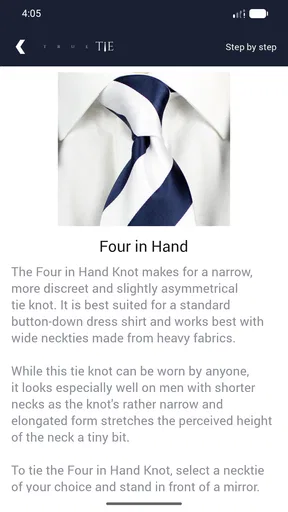
- Clear step-by-step visuals make knot techniques easy to follow.
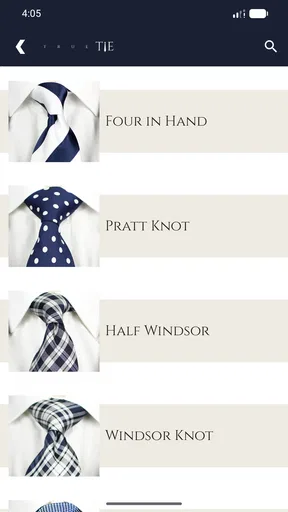
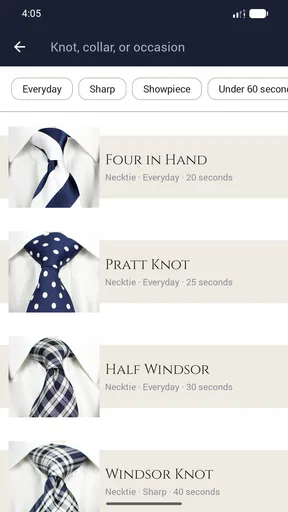
- Includes several classic knots for work, weddings, and formal events.
- Useful offline when preparing for an event without internet access.
- Quick instructions help beginners tie a knot in just a few minutes.
- Compact design makes it convenient to consult while getting dressed.
Limitations of True Tie: Tie Knot Guide
- Limited value for users who already know several tie knots.
- Some instructions may feel too basic for experienced users.
- Small screens can make detailed folding steps harder to see.
- Does not replace practice when learning more complex knots.
- Knot selection may not cover every regional or personal style preference.
Similar Picks in This Category
View All
Beauty Makeup Editor & Camera
Photo & Video Editors - Instant Solution4.7

Perfect365: Face Makeup Editor
Perfect365, Inc.3.5

Mirror Plus - HD Mirror app
Digitalchemy, LLC4.8

Cute Lock Screen & Wallpapers
Prometheus Interactive LLC4.6

HD Camera for Android
One Music Player4.5

Phone Mirror app - True Mirror
Cards4.6
Frequently Asked Questions
What is True Tie: Tie Knot Guide, and who is it designed for?
True Tie: Tie Knot Guide is a practical mobile reference for learning how to tie different necktie knots. It is designed for beginners who need clear guidance before a formal event, as well as users who want to expand their knowledge beyond the basic four-in-hand knot. The app is especially useful when you need instructions quickly while getting dressed.
Which tie knots can I learn with True Tie: Tie Knot Guide?
The app provides instructions for several popular tie knots, although the exact selection may depend on the version available on your Android or iOS device. Tutorials generally focus on well-known styles suitable for business meetings, weddings, ceremonies, and everyday wear. Before downloading, check the app listing and screenshots to confirm that the specific knots you want to learn are included.
Are the instructions easy to follow for someone who has never tied a tie?
True Tie: Tie Knot Guide is intended to make the process less intimidating by presenting each knot as a sequence of manageable steps. Beginners should still pay attention to the orientation of the tie, the wide and narrow ends, and the order of each fold. It may take a few attempts to achieve a neat result, but the visual guidance is useful for practicing at your own pace.
Does True Tie: Tie Knot Guide work without an internet connection?
Offline availability can vary according to the app version and how its tutorials are delivered. Some guides may be stored locally after installation, while other content could require an internet connection or may include online resources. If you expect to use the app while traveling or in a location with limited connectivity, review the store description and test the tutorials before relying on it for an important occasion.
Is True Tie: Tie Knot Guide free, and are there advertisements or in-app purchases?
The cost and monetization model may differ between the Android and iOS versions, so users should check the current store listing before downloading. Some editions of tie-knot guide apps are free but supported by advertising, while others may offer additional content through in-app purchases. Reviewing the permissions, pricing details, and user feedback can help you understand what to expect.
